Patch notes
Install the latest script, then reload the game. Reporting-service fixes apply automatically.
1.2.128 · Town trips no longer stop on an item the merchant won't buy
- A town trip could stop at the weapon merchant with "Inventory rejected: 2". The bot had tried to sell an item the game does not allow merchants to buy (quest and event items, for example), and one refusal ended the whole trip.
- Items the game marks unsellable are now never offered, even with a Sell rule. They stay in the pet or bag.
- If the merchant still refuses an item, the bot keeps it, logs a warning and sells the rest, then carries on with the trip.
- Written from the code and simulated game state; not yet seen on a live server.
1.2.127 · Bag selling no longer stops on a full bag
- With Sell items from the character bag too on, a town trip with a completely full bag stopped before it ever reached the merchant that sells: at arrival ("free a character bag slot"), or at the potion merchant (no room for potions).
- Now, with that switch on, the trip goes to the repair merchant first (sell, ammunition, repair), then the potion merchant, then the world statue. A full bag is emptied before potions are bought. With the switch off, the order is unchanged.
- Written from the code and simulated game state; not yet seen on a live server.
1.2.126 · Sell from the character bag on town trips
- New switch in Scroll town cycle: Sell items from the character bag too. When on, the town trip sells unprotected items from your own bag at the repair merchant, after the pet loot, by the same rules as pet loot. Off by default.
- Never sold from the bag: potions, scrolls, supplies, Keep names, buff-set gear, the alchemy weapon, and anything with a Store, Keep or Drop rule. A Sell rule always sells.
- Tested in simulation only; not yet confirmed on the live server.
1.2.125 · Keep reconnecting through a long outage
- Overnight the bot could end up stopped with the game's "Disconnected from the server." box on screen. Two gaps: that plain box (no "session ended" text) only ever repeated the same enter-character attempts, which fail once the server has dropped the login; and the limit of 3 page reloads per 30 minutes was permanent, so a server that was down for hours used up the reloads and the bot never tried again.
- Now, when the resume and three fresh entries have failed, the bot reloads the page just like after "session ended": the game restores the login from its own session cookie, the bot enters the character and hunting resumes.
- The reload limit is a pause: once the oldest reload is 30 minutes old, the bot tries again, for up to the 12 hours it keeps reconnecting. Written from the code and simulated game state; not yet seen on a live server.
1.2.124 · After a disconnect in town, do the town services and reverse
- After reconnecting, the bot walked from town to the hunting spot in short legs. From town that route often does not exist ("no walkable route to the hunting spot"), so it gave up and the character stayed in town.
- Now, when the character is back in a town far from the hunting spot and the town cycle's "Revive in town and reverse to last scroll point" is on, the bot runs the same trip as after a death: town services (potions, repairs, storage), then the reverse scroll to the last scroll point, then hunting. This covers a disconnect in town, while loading town, or a death while disconnected.
- Without that setting, or when the character is not in a known town, it still walks back as before. Written from the code and simulated game state; not yet seen on a live server.
1.2.123 · Alt accounts keep applying to the main's party
- With two alt accounts joining the same main, one could get in while the other sat on "Waiting for the party board…" forever. The main answers one application at a time, so the second application could be dropped, and the alt never tried again.
- An application that has not been answered after 30 seconds is now sent again, for as long as the alt is outside the main's party. The check already ran on every tick; only this wait was open-ended. Found by reading the code with two alts in mind; not yet confirmed on a live server.
1.2.122 · Revive and return after dying while disconnected
- If the character was killed while the connection was gone (mobs kept hitting it), the bot came back, saw a dead character and gave up: "hunting was not resumed". It never revived or walked back to the hunting spot.
- Now, when hunting was running and the character comes back dead, the bot starts hunting again so the normal death handling takes over: it revives (with "Revive at return point and continue" or the town auto-revive on) and walks back to the hunting spot. With "On death" set to "Stop hunting", it stops after the death, as it always does.
1.2.121 · Recover from an expired game session
- When the connection is gone for more than about 30 seconds the server ends the game session, and the game shows "Your session ended while the connection was gone. Please log in again." The bot used to keep trying to resume that session, which can no longer work, and the window stayed on screen.
- The bot now skips the resume and enters the character again straight away. If that has not brought the character back after 30 seconds, it reloads the page: the game restores your login from its own session cookie, the bot enters the character and hunting resumes, as after a failed load (1.2.120). It shares that reload limit of 3 per 30 minutes.
- The window's Confirm button is never pressed, because it logs you out. If the login really is gone, the status line says so and the bot waits for you. Written from the game's own code and simulated game state; not yet seen on a live server.
1.2.120 · Reload the page when the game fails to load
- When the game's loading screen gives up ("Unable to finish loading", for example "Renderer failed: Invalid particle graph time"), the bot waits 15 seconds, then reloads the page by itself. It remembers the character and whether hunting was running, so after the reload it enters the character again and resumes hunting, the same way it does after a lost connection.
- It never types or stores your password: the game restores your login from its own session cookie. If the login is gone, the status line says so and the bot waits for you.
- It reloads at most 3 times in 30 minutes, then stops and tells you, so a game that cannot load does not reload forever. Logging out or entering a character yourself cancels it. Tested against the game's own code and simulated game state, not yet on a live server.
1.2.119 · The panel is now called NIX
- The panel title now reads NIX followed by the version, instead of "nixxane bot".
- Nothing else changes: the script keeps its installed name inside Tampermonkey, so it updates in place and nobody has to reinstall. Settings, saved profiles and shared settings are untouched.
1.2.118 · Alt accounts join the main account's party
- Join the main account's party: a new option on the Party page (Party/Autores in the Classic window) for your other accounts. Tick it and type the main character's name. While the character is not in a party, the bot accepts a party invitation from the main, or finds the main's listing on the party-matching board and applies to it. It does nothing while the character is in another party, and the status line says what it is doing (looking for the listing, applying, party full, level outside the listing's range).
- On the main account, tick Auto-recruit and Auto-accept party-matching joins so the listing is there and the applications are answered. Leave the new option off on the main account.
- It also brings an account back into the party after a disconnect: once automatic reconnect has the character back in the game, the party is rejoined the same way. Tested with simulated game state only, not yet on a live server.
1.2.117 · Classic window and Max every skill
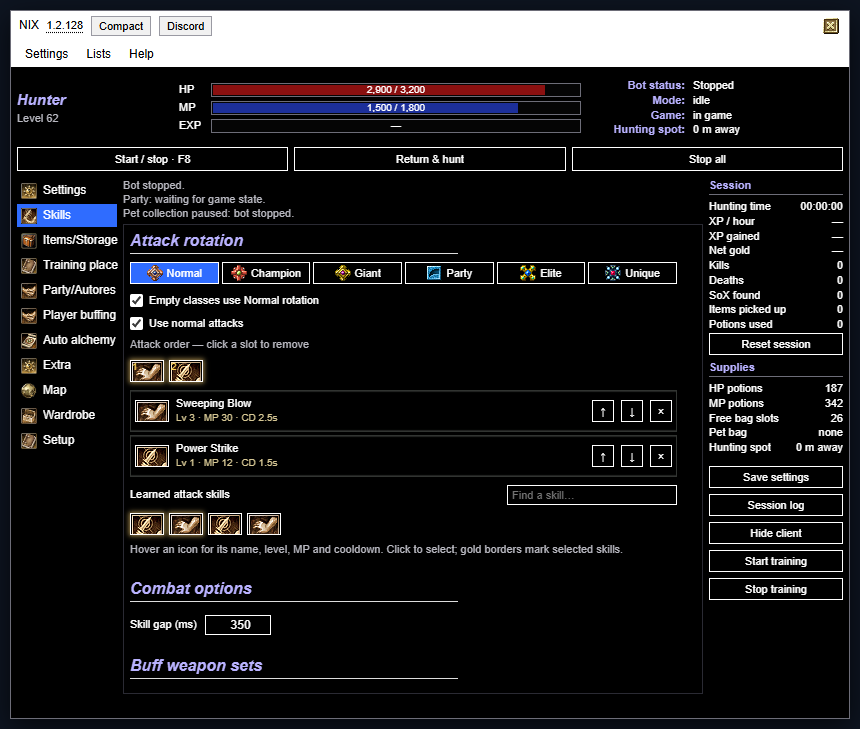
- Classic window: a third layout, opt-in with the Classic button at the top of the panel (screens at least 900 px wide). It is a fixed-size window laid out like SBot: a menu bar, HP, MP and EXP bars with the bot status beside them, three wide buttons (Start / stop, Return & hunt, Stop all), the tabs down the left, and your session numbers, supplies and Start / Stop training always on the right. The tabs are Settings, Skills, Items/Storage, Training place, Party/Autores, Player buffing, Auto alchemy and Extra, then Map, Wardrobe and Setup. They hold the same settings as the compact and wide pages, so a change made in one window shows in the others. Compact brings the small window back.
- Max every skill: a new button under Settings → Auto mastery and skills (the Extra tab in the Classic window). It learns and upgrades every skill, level by level, including skill lines you have not started, as fast as the game answers. It raises a mastery only when that mastery is what blocks a skill, ignores the gap and reserve settings, and when nothing more is allowed it stops and says what is left (skill points, strength or intelligence). Stop ends it early.
- The compact window reserves less space for its status lines, so it is no longer taller than before, and the town, walk-back and reconnect messages show in the waiting note only. Fixes the panel running off the bottom of short screens in 1.2.115 and 1.2.116.
1.2.116 · Walk to a far hunting spot
- Return & hunt, revival return and reconnect now walk to a hunting spot more than 600 m away instead of telling you to walk there yourself. The trip is walked in short legs, because the game only publishes collision data for the area around the character; each leg crosses into the next region and the next leg is planned from the newly loaded map.
- The status line shows the leg and the distance left. A blocked leg end is replaced by a nearby walkable point, and a leg that makes no progress is retried before it is reported. Death, manual control and Stop all cancel the walk at once.
- A spot beyond about 14 km, a walk longer than 30 minutes, or one that stops making progress is cancelled with a message instead of walking forever. Another world and dungeons still have no walking route.
- A long-range route planner is built in and will take over for trips inside one map area once its route data is published; until then the bot walks in legs.
1.2.115 · Narrow window: buttons stay put
- In the compact window the status lines and the waiting note changed height as lines came and went, which moved the buttons below them and caused misclicks. They now reserve their space, so the buttons stay where they are.
1.2.114 · Wide window: no more gaps between boxes
- In the wide window each page is shown in two columns. A short box next to a tall one used to leave a gap under it. The boxes are now dealt into two stacks, each under the shorter one, so the columns close up. The map, item table, member list and trip pictures still use the full width.
- Switching between Compact and Wide redraws the page, so the layout is right straight away.
1.2.113 · Detailed activity log, pop-out session window and return choices
- Structured activity history, contributed by Joggio: categories, outcomes, session markers and grouped repeats, with filters, search, pause and follow, an optional bounded 10-minute command capture, and a local export with a preview. Names, free text and positions stay out of an export unless you tick raw, and nothing is uploaded.
- Messages use monster names and plain language. Cast code 5 becomes one Skill not ready yet row with a count instead of repeated warnings. Select log text and press Ctrl+C to copy it.
- A session window with live totals and the log opens from the Session button, or from Pop out under Settings, Recent activity. It never opens by itself, stays on screen when you minimise the bot, and closing it does not stop hunting.
- The status lines, the feedback line under the buttons and the wide window's Activity box stay on the main panel.
- Potion delay in milliseconds, saved per character, under Supplies.
- Town revival can reverse to the last return-scroll point (the default) or to where you died. The death spot is only used when you died inside the hunting area, because hunting starts again only from inside it; a death further away reverses to the scroll point.
1.2.112 · Follow a party member (auto trace)
- New Follow a party member group on the Party page. Tick it, choose a member (or leave it on the party leader) and the bot stays within the distance you set of them while hunting, and hunts around them instead of around your saved hunting spot.
- The game tells the party where every member is, so the bot also follows them across the map when they run off, up to 300 m. It walks around obstacles when collision data is loaded, and stands beside the member, not on top of them.
- Your saved hunting spot is never changed: it is only swapped for the member's position while the hunting step runs, and used again as soon as following is off or the member is unavailable (not in the party, dead, in another area or too far).
- Fight monsters that attack on the way is on by default. The stuck check does not count waiting for the member as being stuck. The chosen member is never part of a share, and the status line says what it is doing.
1.2.111 · Setup page: a live checklist for new characters
- New Setup page, the first one in the list, and the page a character opens on until it has a hunting spot or attack skills. It is a checklist that reads your real state: character and weapon, hunting spot, attack skills, potions (and how many are in the bag), what to pick up, town trips, pet, and what happens on death.
- Every row says in a sentence what is missing and has one button: Set here saves the hunting spot, Pick skills opens the skill page, Turn on switches potions or pickup on, Set up town fills your town and turns town trips on when nothing is missing, and Fix the next thing jumps to the first red item.
- Starter settings: Level up, Farm drops and Safe AFK. Each is laid over your current settings, so your skills, hunting spot and town stay. You see every changed setting first, nothing changes until you press Apply, and Undo last change brings the old settings back.
- Nothing changes by itself: the page only reads the game and your settings until you press a button.
1.2.110 · Share and import settings
- New Share and import settings group in Settings. Copy share code or Save share file gives a short code or a file with only the settings you changed from the defaults, ready to post in Discord.
- A share never contains your hunting spot, town and merchant points, walking routes, buff weapon sets or wardrobe, so it is safe to hand out and works on any character.
- To import, paste a code or open a file and press Preview import. It lists exactly which settings would change, and only Apply import changes anything. Your own positions, town points, buff weapon sets and wardrobe are kept, and Undo last import brings your previous settings back.
- Imports are read as plain data: files that are not a nixxane bot share, contain unsafe keys, or are too large are refused, every value must have the type of the setting it replaces, and unknown settings are dropped. Old exports from the previous Export button still import.
- The old Export button is now called Export full backup (with my positions).
1.2.109 · Fix: stat point settings are kept after a reload
- The Stat points settings from 1.2.108 were not saved: they went back to off every time the game was reloaded. They are now kept with the rest of your profile.
- A new test checks that every setting group survives a reload of the saved profile, so a new group cannot be forgotten like this again.
1.2.108 · Auto stat points (Strength and Intelligence)
- New Stat points group in Settings: tick Spend stat points automatically and the bot spends your unspent stat points on Strength and Intelligence, one point at a time, as you level up.
- The split is a ratio. 1 and 0 puts everything into Strength, 0 and 1 everything into Intelligence, 2 and 1 spends two Strength points for every Intelligence point. A reserve keeps some points unspent.
- Each point is confirmed by your unspent count going down before the next is sent. A point the game does not accept is not resent for a minute. It is off by default and the status line says what it is doing.
1.2.107 · Buff weapon swapping explains itself
- The Buffs & imbue page now lists every buff assigned to a weapon set and what it is waiting for: how many seconds an active buff has left (the swap only happens when it is about to end), that it is due now, that the skill is not learned, or why it was skipped.
- When a buff is due but the swap cannot start, the page says why instead of staying silent: a saved set whose weapon or shield cannot be found in the bag (or two copies look identical), a missing combat weapon, no free bag slot, no saved set, or no buff assigned to a set.
- A buff whose cast was only unconfirmed is tried again after two minutes. Before, it was skipped until you changed buff settings, so a single missed confirmation could stop swaps for good.
- The buff weapon status is part of the diagnostics export, so a bug report shows what the swap was waiting for.
1.2.106 · Town setup: pick your town, no need to stand in it
- The Town page has a Town list and a Set up this town button. Pick Hotan, Jangan, Donwhang, Constantinople or Samarkand and one click fills the arrival point, warehouse, potion merchant, repair merchant and world statue. You no longer have to use a return scroll and stand where it lands first.
- The arrival point is now a preset too. Each town's return scroll always lands on the same spot, so the bot knows it from the server's own data instead of using wherever you happened to be standing.
- Auto-set town services and Redo all automatically still work for the town you are in, and now also use the preset arrival point.
1.2.105 · Alchemy: aim for stat percentages with attribute stones
- New Item attributes group in the Alchemy tab. Pick an item, choose the lowest percentage you want for each of its stats (Phy. reinforce, Mag. reinforce, attack rating, attack power, critical, defense, block, absorption and so on, depending on the kind of item) and press Fuse attribute stones. The bot fuses attribute stones of the item's degree until every picked stat reaches its target.
- Every successful fusion rolls the stat again, so it can come out lower, and it can re-roll another stat of the item; the bot keeps going until all picked stats are at or above their targets, and the log names any other stat that changed.
- The tab shows each stat's current percentage and a rough number of stones each target takes (the chance is 50% per stone before bonuses and the top steps get rare fast), and a stone limit (100 by default) stops it. It stops with a message if a stone of the right kind is missing from the bag.
1.2.104 · Stuck-character recall fix
- If the optional recovery recall could not start a town trip, hunting kept running and the stuck check repeated forever. Hunting now stops with the alert, like when recall is off.
- Reviewed the 1.2.101 to 1.2.103 obstacle and attack-retry changes (tests, browser test and native navigation comparison all pass).
1.2.103 · Fix attack retries and cross-target skill pauses
- Fixed skills being falsely paused while the character was still approaching a monster outside skill reach.
- Attack rejection pauses now apply to the affected monster, so a failed target does not leave skills paused against the next one.
1.2.102 · Safer obstacle pursuit and escape recovery
- Blocked enemies are checked before repeated attack approaches; unreachable targets are released and dropped, and detours use collision-checked short steps.
- Escape needs fresh, stable arrival plus a second move before hunting resumes. Settings adds an optional recovery recall and local escape diagnostics, both off by default.
1.2.100 · Alchemy helper stones: a simple Use switch for each
- Luck, Steady, Immortal and Astral now each have a Use switch. When it is ticked, the bot fuses a stone automatically before every attempt at or above the plus you set whenever the item has fewer charges than you asked it to keep, so the stones are used while enhancing without any extra clicking.
- Before, a helper only ran when its count was set above zero and the counts started at zero, which made it look as if the stones were never used. The counts now start at 1 and mean how many charges to keep, and old settings keep their helpers switched on.
- The Alchemy tab says which helpers it will use, from which plus and how many charges it keeps, or says that none are ticked.
1.2.99 · Alchemy tab: every gear kind, rules from +N, odds and a results log
- The Alchemy tab now enhances weapons, shields, armour and accessories, each with its own elixir (the A and B elixirs of its kind). Before, only weapons worked.
- Rules from a plus: use lucky powder from +N, and Luck, Steady, Immortal and Astral stones from +N. A missing charge is fused automatically from stones of the item's degree before the attempt, so you do not have to fuse them by hand. The defaults follow the server: Steady and Immortal from +5, where a failure can start to destroy or damage the item.
- The tab shows the real odds taken from the server's data: the chance of the next attempt (with powder and Luck counted like the server does) and how many elixirs you should expect to need to reach your target, and the chance of getting there without a single failure.
- A results panel with attempts, successes, failures, destroyed items, the highest plus reached, the success rate, what was used, and a timestamped log of each attempt and fusion.
1.2.98 · Auto skill upgrades can cover every learned skill
- New dropdown Skills to upgrade under Settings → Auto mastery and skills: Only skills in my rotations, buffs and imbue (the default, as before) or All skills I have learned. With All, the skills you use are raised first and then every other skill line you already have.
- It still only raises the next level of skills you have already learned, within the game's own rules (mastery level, strength, intelligence, prerequisites, skill points and your reserve). It never learns brand-new skills.
- The status line lists at most the first eight reasons, so a long skill list does not flood it.
1.2.97 · Auto skill upgrades say what they see
- The auto mastery and skills status now names each skill it is not raising and why: not learned yet, already at its highest level, mastery or strength too low, a prerequisite missing, or not enough skill points. It also says when your rotations, buffs and imbue hold no skills yet, and when the skills switch is off.
- The skill upgrades only cover skills you already learned that are in your attack rotations, buffs or imbue on the Combat tab. The dropdown that was called Spend skill points on is now Order when both are ticked, because it does nothing unless both switches are on.
- The bug report now includes this status line.
1.2.96 · Waits for a party resurrection before reviving itself
- Fixed: with Accept resurrection from party members on, the bot was meant to wait 20 seconds before reviving itself when a party member is around, but the check for a living helper was the wrong way round, so it only waited when the helper was dead. It now waits the 20 seconds whenever a living party member is in view.
- A helper seen in the last 15 seconds still counts, so a moment out of view does not cut the wait short.
- The Activity log now says what it is doing when the character dies, for example Died: waiting 20 s for a party member to resurrect before reviving.
1.2.95 · Notices a character that cannot move
- A character that should be walking (chasing, returning or picking up) but has not moved at all for 20 seconds, with nothing being damaged, is now treated as stuck, for example inside a tree. It first steps back to where it just was, then walks to the nearest open ground.
- If both fail, hunting stops with an alert chime and a clear message, instead of the character standing there for minutes. It does not use a return scroll on its own.
- When it happens the Activity log says whether the collision data thinks the character's tile is blocked, and the bug report shows the same, to help find why characters get stuck in trees.
- Settings → Obstacles switches it off or changes the 20 seconds. Tested on the simulated game only; not yet seen on the live server.
1.2.94 · Says why it went to town
- Every town trip now writes its reason to the Activity log, for example Town trip started: potions running low, and the town status line shows it during the trip. Reasons are bag nearly full, pet nearly full, potions or ammunition low, weapon broken, gear worn, no XP for a while, every set number of minutes, returning after a death, or started by you.
- The Activity log is in the Wide window: press Wide in the title bar.
- The bug report shows the reason of the current or last trip and how long ago it started, without item names.
1.2.93 · Find the exact item that drops, and see its number in the pickup line
- A Pick always rule on the Items page takes an item whatever the Loot switches say, so you never need to switch on a whole kind like potions to get one item. The rule is for that exact item, and each size or degree is its own item.
- New on the Items page: Only items on the ground now, which lists just the items in view, so you can set the rule on exactly what is dropping.
- The pickup status line now shows the item numbers behind each skipped kind, for example 12 potions #19 #20, to compare with the number shown when you point at an item in the Items table.
1.2.92 · The pet and the character can each pick up their own items
- Loot has a new section, Who picks up what: every kind of drop is set to Leave on the ground, Pickup pet or Character. The pet can collect elixirs and equipment while the character takes the potions and pills it wants on itself.
- The status line for a pet that is not picking up now names the item kinds that are switched off, for example 52 not wanted (30 equipment, 22 other items), instead of a general list of possible reasons.
- The old Collector setting is now Default collector and still decides for anything you do not set yourself.
1.2.91 · Walks around trees and walls while chasing
- A character that stood still against a tree or wall while chasing a mob used to stay there until the no-damage timeout dropped the mob. After 2.5 seconds without moving or hurting its target, the bot now checks the game's collision data and, if the straight line is blocked, walks around the obstacle, then attacks as normal.
- After three detours on the same mob it drops that mob for a minute and picks another.
- Settings → Obstacles switches it off or changes the wait. It needs the game's collision data and works outdoors only. Built from a simulated game with a wall; not yet seen on the live server.
1.2.90 · The bot is now MIT licensed
- Added an MIT licence under nixxane, so anyone can use, change and build on the bot, including inside other projects. The script header now says so.
1.2.89 · Items page: a rule for every item
- New Items page with every item in the game, filtered like sBot: item group, race, gender, type (armour part and material, accessory, weapon kind), degree, a search box, and "Only items with a rule".
- Per item: Pick (always or never), Store (warehouse on town trips), Sell (from the pet at the repair merchant), Keep, or Drop (thrown away from your bag or the pet while hunting, never picked up again). Click a cell, right-click a row, or use the buttons above the table to set every item shown (they ask for a second click).
- Rules come first; items without one follow the Loot switches and town settings as before. Your own bag is never sold, and potions and scrolls the town trip needs are never stored from it.
- With ten pages, the compact window now shows its page tabs in two rows.
1.2.88 · Small monsters first
- While fighting a stronger monster (a giant, say), the bot now switches to a weaker monster that is hitting you, kills it, and goes back. Before, it kept hitting the giant while the small ones wore you down.
- It only switches for monsters actually hitting you within chase distance, and only to a weaker class: two giants hitting you is no reason to switch.
- A target below 25% HP is finished first, and it never switches in the middle of a cast.
- The weakest attacker goes first (normal before champion, the most hurt one first), and it does not bounce back and forth while the giant keeps hitting.
- The status line says when it happens, for example "switched to Mangyang (hitting you); back to Tiger Girl after".
- The minimised icon could flash yellow for a moment after Stop all ended a walk back; it now shows the right colour straight away.
Always on; there is no switch for it.
1.2.87 · Heal and buff your party
- New Party page. Tick "Buff and heal party members" and the bot supports the party with your own skills: a group heal when enough members are low, a heal on the lowest member, then party buffs on whoever does not have them yet. One cast at a time, after your own potions and before attacking.
- Pick party buffs from your learned skills that can target a party member. Each goes to everyone, or only to the names you list.
- It only casts on members you can see within the support range (30 m by default) and never walks to them. A buff that does not show up on a member after two tries waits a minute.
- The top of the page lists your party with HP and MP bars, distance, and which of your buffs each member has.
- The party options (auto-recruit, matching, resurrection) moved here from Settings.
Off by default. It runs while hunting; tick "Also while hunting is stopped" to support a party while you stand still.
1.2.86 · Town page and new reasons to go to town
- New Town page. It shows the trip as a row of pictures (return scroll, warehouse, potions, repair, reverse) with what each step still needs, and everything that starts a trip in one place. The scroll town cycle settings and Arrows and bolts moved here from Supplies.
- Weapon is broken: a trip starts when your equipped weapon is at 0 durability, so it gets repaired instead of hitting with bare hands. On by default.
- Gear is worn: a trip starts when the most worn piece you are wearing drops below a percentage of its own maximum durability (15% by default). Off by default.
- No XP for a while: a trip starts after a number of minutes without experience (10 by default). Off by default.
- On a timer: a trip every so many minutes (60 by default). Off by default.
All of them need the town cycle on. The XP and timer clocks run only while hunting and restart with every trip.
1.2.85 · The map shows the ground again
- The Map page showed only a black background in the game. The game now publishes its minimap tiles in a new compressed format inside a new kind of asset pack, which the bot could not read. It reads both now, so the minimap appears under the markers.
- The same fix lets the bot read any other game picture that moves to the new packs, so icons keep working after future game updates.
- New Map page, first in the page list. It draws the game's own minimap around you with your hunting radius (yellow circle) and chase distance (dashed ring).
- It shows you (arrow), monsters (uniques and stronger classes stand out), party members (also ones out of sight, at the map's edge), other players with their names when zoomed in, NPCs and pets.
- Click the map to mark a point, then "Make this the hunting spot" to hunt there. Drag to look around, + and − (or the mouse wheel) to zoom, "Follow me" to centre on you again.
- Hunt radius and chase distance can be changed right under the map.
Dungeons have no map yet. In the wide window the map uses the full page width.
1.2.83 · Wide window
- New Wide button at the top of the panel. It opens a wide window: a status strip with HP, MP and EXP bars and what the bot is doing, the pages as a list with the game's own icons on the left, session numbers and supplies always on the right, and the activity log along the bottom.
- The pages are the same as before, set out in two columns, so nothing has moved inside them. Compact goes back to the usual window, which stays the default.
- The choice is remembered. Screens narrower than 900 pixels always get the compact window.
This is step 1 of the new layout shown on the concept page. The map, party and town pages come later.
1.2.82 · The panel remembers where you put it
- The panel now opens where you last dragged it, also after a reload and after bringing it back from the minimised icon. Before, it went back to the top right.
- If the game window got smaller and the saved spot is off screen, the panel is moved back inside it.
1.2.81 · Minimise the panel to a small icon
- The × at the top right of the panel now minimises it to a small icon instead of folding it. The bot keeps running.
- The icon's dot shows what the bot is doing: green while hunting, yellow during a town trip, walk back, alchemy or reconnect, red when stopped, dead or in error. Hover it to see the current status, HP and MP.
- The icon glows when something needs you: a warning such as running out of potions or hunting stopping, a SoX pickup, or the character dying. Hovering it or opening the panel clears the glow.
- Drag the icon anywhere. It remembers its spot, and the panel stays minimised after a reload.
- Click the icon or press F7 to bring the panel back. F7 still folds the open panel, Shift+F7 still hides everything, and F8 still starts and stops.
- The window you opened or clicked last (patch notes, bug report) is now drawn above the others.
1.2.80 · Stone fusion no longer stops at 30
- The 30-fusion stop is now an optional setting, "Stop after this many fusions", under Magic stones for the weapon. 0 means no limit and is the default, so a run goes on until the weapon has the wanted counts, a stone runs out or the game refuses.
1.2.79 · Stone fusion works: it uses the request the server accepts
- Fusing Luck, Steady and Immortal stones was refused by the game with code 16 every time. The bot used the page's attribute request, which the server answers with a refusal for these stones; it now uses the magic request, which is the one the server takes them in.
- A fusion can fail on this server: the stone is used up and nothing changes. That is now counted and the run carries on instead of stopping.
- A refusal now says why, for example that the stone is not of the weapon's degree, or that the weapon is at 6 of that stone or has no free magic option slot.
1.2.78 · The Alchemy tab fuses Luck, Steady and Immortal stones
- New Magic stones for the weapon section in Alchemy: choose how many Luck, Steady and Immortal stones the weapon should have (up to 6 each; 0 leaves one off).
- Fuse stones now only fuses them. Start alchemy fuses the missing stones first, then enhances with elixirs as before.
- Luck raises the enhancement success chance, Steady stops durability damage and Immortal stops destruction when an enhancement fails. The stones must be of the weapon's degree and in your bag.
It stops if a stone is missing, the game refuses a fusion, or when it reaches your optional fusion limit. New in this version and checked against a simulated game: if a fusion does not raise the count, tell us on Discord.
1.2.77 · Arrows and bolts are bought on town trips
- New Arrows and bolts section in Supplies. Tick Buy arrows and/or Buy bolts and set when to go to town and what to refill to.
- They are bought at the repair merchant, after selling pet loot and before repairing. The count includes the stack in your ammunition slot and spare stacks in your bag, and a trip also starts when it falls to your low-stock number.
- If the merchant does not sell the item, there is no bag space or not enough gold, that item is skipped with a notice and the rest of the trip goes on.
Equipping the bought ammunition is still up to you. Both options are off by default.
1.2.76 · Patch notes open in the game, and updates say what they bring
- After an update, a window next to the bot panel shows what changed since the version you used before, so you no longer need Discord to see what was fixed.
- Click the version number at the top of the bot panel to read the notes again.
- When a newer version is out, the top of the bot panel says what it brings, for example "Update 1.2.77 available: …", so you can tell whether to install it now.
The bot keeps running while the window is open; close it with Got it. Updating to 1.2.76 already opens it, with these notes.
1.2.75 · The imbue is cast during other skills and no longer wasted
- A skill takes the weapon imbue when its cast ends, not when it starts, and the game accepts an imbue while another skill is being cast. The bot waited for the current skill to finish first, so when the imbue came back mid-cast, that skill landed without it while the imbue icon was ready.
- The imbue is now cast as soon as it runs out, also in the middle of another skill's cast. With skills cast back to back, far more hits now carry the imbue.
- The Renew imbue when seconds left setting from 1.2.74 is removed. An imbue's cooldown is as long as the imbue itself, so it can never be renewed earlier, and the setting only made coatings recast early and waste MP.
1.2.74 · Imbue is renewed before it runs out
- The weapon imbue was only renewed when under 0.4 seconds were left, and only before a rotation skill. A skill takes a second or more to cast, so the imbue could run out while the skill was still on its way, and normal attacks never renewed it.
- It is now renewed while 3 seconds are left (new setting Renew imbue when seconds left under Combat, Buffs & imbue), before the next skill and before normal attacks too.
Corrected in 1.2.75: the imbue's cooldown is as long as the imbue, so it could not be renewed earlier. The real cause of the gaps was the bot waiting for the current skill to finish; the setting was removed.
1.2.73 · New Discord invite
- The old Discord invite link expired. The button, README, guide and site now use the new one: https://discord.gg/Y5H5ZyfQ7u. If the button says the invite is invalid, update the bot.
1.2.72 · The town trip no longer waits forever at the wrong arrival point
- The bot waited for the return scroll to bring the character near the saved arrival point. If that point was saved somewhere else in town, the status stayed on "Waiting for arrival area: 76 m from saved point; tolerance 50 m" and the trip never continued.
- Now, after a recall the game confirmed, once the character has stood still for three seconds in a known town, that spot is saved as the arrival point and the trip continues. It only does this in the town the saved services belong to.
- New Discord button at the top of the panel, next to the version. Updates, suggestions and bug reports now have a home: https://discord.gg/Y5H5ZyfQ7u.
- After each update the bot shows a short notice once, pointing to the button. First-time installs get a short welcome with the same pointer.
- Releases are published on GitHub with their notes so they can be announced on Discord automatically.
1.2.70 · Automatic town setup
- New Auto-set town services button in Supplies. Use a return scroll, press it where you land, and the bot fills the arrival point, warehouse, potion merchant, repair merchant and world statue for you. No more selecting and saving each NPC.
- Works for Hotan, Jangan, Donwhang, Constantinople and Samarkand, using the server's own NPC positions. The bot recognises the town from where you stand, so recall can be bound to any of them.
- It only fills empty entries; Redo all automatically replaces every saved point. Manual saves still work and override the automatic ones.
- The section is now called Scroll town cycle instead of Hotan scroll town cycle.
Confirmed working in the game. Towns other than the one tested use the same method and data, so report any that stall.
1.2.69 · The status line says why the pet is not collecting
- When the pickup pet is ready but nothing is collected, the status line and Send bug report now count the drops in view and say why each is skipped: item type switched off, too far from you, outside the hunting area, owned by another player, too far from the pet, pet not ready, or no room in the bag.
- Finish current fight before character pickup only applies to a character collector. A pickup pet collects during fights whatever it is set to; this is now written in the README.
1.2.68 · Party members no longer count as other players' targets
- With "Avoid other players' targets" on (the default), the bot skipped every monster a party member, or a party member's pet, had just hit. In a party that left it with few or no targets. Hits by party members now count as yours; strangers and their pets still count.
1.2.67 · The status line says why no monster is attacked
- When the bot is "searching for an eligible target", it now counts the monsters in view and says why each was skipped: monster type switched off, level outside your limits, name filters, too far (Hunt radius or Chase distance), another player is fighting it, or recently given up. With nothing in view it says so.
- The same line is in Send bug report, as counts only, so a report of a bot that does not attack shows the cause.
1.2.66 · Berserk by monster kind, and stones go to the warehouse
- Berserk is now a list of monster kinds (Giants, Titans, Uniques, Elites, Party monsters, Champions, Normal monsters) instead of one dropdown. Only Giants are ticked by default, so champions no longer use it. Profiles that had Berserk off or on for everything keep that; Champion and above becomes Giants only.
- Magic stones and attribute stones have their own switches in Loot, each keeping your old Other alchemy items setting.
- Both kinds of stone are stored in the warehouse on the next town trip, from the pet and from your own bag, and are never sold. Magic stones include the Astral, Luck, Steady and Immortal stones.
Attribute tablets are not stones; they stay under Other alchemy items and are sold from the pet like before.
1.2.65 · Hunting continues after a resurrection
- If hunting was running when the character died, it now resumes after a resurrection you accepted, whatever On death is set to. At the hunting spot it just starts, a short way off it walks back first, and elsewhere it stays stopped and tells you.
- With Accept resurrection on and a party member in view, a bot set to revive waits up to 20 seconds instead of 5 before reviving itself, and never revives while a resurrection offer is open.
Only accepted resurrections resume hunting; a revive you do yourself does not.
1.2.64 · Automatic reconnect
When the connection to the game is lost, for example during a server restart, the bot now reconnects by itself: it waits for the game's own retries, asks the game to resume, and otherwise re-enters the world with the login the page already holds. Hunting that was running resumes once the character is back at the hunting spot.
Always on, with no switch. It never types or stores your password; if the login is gone after a restart, the status line says so. Logging out or disconnecting yourself cancels it.
1.2.63 · English everywhere
Every message the bot can show is now English, including log lines, error text and wardrobe messages that were still partly Turkish. The build now refuses to ship any Turkish text.
1.2.62 · Vigor potion restock
Supplies → Potion restock can now buy vigor potions: choose the size (Herb, Small, Medium, Large or X-Large) and set the low-stock and refill amounts. Town trips and walking restock buy them, and a trip also starts when the vigor stock runs low.
Off by default. If the potion merchant does not sell the chosen size, the trip stops with a message.
1.2.61 · Pet potions and vigor thresholds
- New Supplies → Automatic potion use: Use recovery kits on my pets. When an attack or pickup pet drops below the HP you set, the bot uses the smallest recovery kit that covers the missing HP. Your own potions always go first.
- Vigor potions already worked automatically; their HP and MP thresholds can now be changed in the same section.
Pet kits are off by default and are not bought in town yet.
1.2.60 · Town walk diagnostics
When a town trip stalls on the way to a merchant, the status line and bug reports now say why: waiting for collision data, no walkable route, or a blocked route. Bug reports also include whether collision data is loaded. No NPC or character names are included.
The README explains what to do for each message. The bot still never walks blindly through obstacles.
1.2.59 · Deposit gear by level
New under Supplies → Hotan scroll town cycle: Also deposit gear requiring level. List levels such as 85, or ranges such as 80-90, and town trips store any equipment requiring those character levels in the warehouse, from your bag and from the pet. Listed gear is never sold.
Empty by default. Buff-set weapons, the alchemy weapon and Keep names stay put, as with SoX deposit.
1.2.58 · Safety fixes
- The SoX warehouse deposit no longer takes gear you rely on: a saved buff set's weapon or shield, the weapon chosen for alchemy, or anything matching your Keep names. Versions 1.2.50 to 1.2.57 could deposit those from your bag.
- An error in an optional feature (party automation, auto mastery, SoX alerts) is now logged and skipped instead of stopping hunting.
If a buff weapon was deposited by an earlier version, take it back from the warehouse and save the buff set again.
1.2.57 · Normal attack reasons
- When a character uses normal attacks instead of skills, the status line now says why (not learned, paused after a server rejection, cooling down, not enough MP, MP below your minimum, or an empty rotation). The reason also goes to Recent activity and bug reports, as counts only.
- A skill is no longer paused after a slow game update: it is only treated as rejected once a newer update arrived and its cooldown still had not started.
The cause of skills occasionally being skipped is not confirmed yet; this release makes it visible. Tell us the reason you see.
1.2.56 · Auto skills and reserve
- Settings → Auto mastery and skills can now upgrade the skills in your attack rotations, buffs and imbue, learning the next level as soon as the game's requirements are met.
- New skill point reserve: points you want to keep are never spent on masteries or skills.
- New spend order: masteries first, skills first, or alternating.
All off by default. Skills outside your rotations are never touched, and each level is confirmed before the next.
1.2.55 · Mastery gap
Auto mastery can now leave a gap: Settings → Auto mastery → Keep this many levels below my level. With a gap of 2 on a level 30 character, no mastery goes past 28.
The default is 0, which behaves as before. The game's own limits (your level, 120) still apply.
1.2.54 · Auto mastery
New Settings → Auto mastery: tick the masteries you want and the bot spends skill points to raise them one confirmed level at a time, in the order you chose. It follows the game's rules (never past your character level or 120, level 0 is free) and works while hunting is stopped.
Off by default. If the server refuses a level, the bot waits a minute before retrying that mastery. Skills are not touched.
1.2.53 · Accept resurrection
New Settings → Party switch: when you are dead and a party member casts Rebirth on you, the bot answers Yes. Works while hunting or stopped.
Off by default. Only party members are answered; offers from other players and mutation offers are left to you.
1.2.52 · Party accept fix
Fixed auto-accept ignoring applicants after the first party member joined and left. The game could keep sending applications while the bot had lost track of your listing; it now accepts them as long as you are the leader (or solo) and there is room.
Found from a bug report. Leader, capacity and deadline checks are unchanged.
1.2.51 · SoX alerts
When the bot confirms a pickup of Star, Moon or Sun equipment it shows the item name and tier and plays a short chime. Settings → Session stats now counts SoX found.
On by default; switch it off or test the sound under Loot. Needs the item catalogue, which loads when hunting starts. Only bot pickups are announced.
1.2.50 · SoX deposit
Town trips now deposit Star, Moon and Sun equipment in the warehouse, from your own bag and from the pickup pet. It happens on the next trip that visits the warehouse, never right after pickup. Other seal gear in the pet and everything else in your bag stays put.
On by default; switch it off with Deposit SoX gear in the warehouse under Supplies → Hotan scroll town cycle. Needs the warehouse saved.
1.2.49 · Panel cleanup
- With the town cycle on, walking-route restock and merchant recording are hidden, since every trip buys potions in town.
- On death is replaced by a note when town revive is handling it, and the rest thresholds only show while Rest when low is ticked.
- Removed the duplicate Walk back button; Return & hunt walks to your spot and starts hunting. The titan monster class is labelled as using the Unique rotation.
No behaviour changes; only controls that did nothing were hidden.
1.2.48 · Bug report window
Settings → Send bug report now opens a draggable window over the game instead of expanding the bot panel. Same preview, explanation and optional screenshot; the main panel stays put.
Closing the window discards the draft. Nothing is sent unless you press Send to developer.
1.2.47 · SoX filter fix
Loot → Equipment: only SoX now filters equipment only. Gold, potions and other items follow their own switches again.
1.2.46 · SoX-only equipment
New Loot option to collect only Seal of Star, Moon and Sun equipment and leave plain gear behind. Works for character and pet collection.
Needs the item catalogue, which loads automatically; nothing is taken until it has. Version 1.2.46 also skipped gold and other items, which 1.2.47 corrects.
1.2.45 · Smoother scrolling
- The panel keeps its scroll position when you add or remove skills, save town points or change wardrobe filters.
- The scrolling area now fits the window height, and wheel scrolling no longer moves the game behind the panel.
1.2.44 · Cleaner panel
Removed duplicate controls: the second weapon imbue picker, the Pet: elixirs only button, the Copy and Save diagnostics buttons, and Import original bot settings. Settings → Send bug report remains.
Choose Pickup pet in the Collector dropdown yourself; the loot presets no longer change the collector.
1.2.43 · Anti-stuck
Settings → Anti-stuck watches for kills, XP, gold, pickups and damage to your target. With no progress for 3 minutes it drops the target, then walks back to the hunting spot, then stops hunting after the set number of failed recoveries.
Time and recovery limit are adjustable. Resting, buffing, looting, shopping and town trips never count as stuck.
Earlier updates · 1.2.29–1.2.42
1.2.42 · Session stats
Settings → Session stats shows hunting time, XP/hour, net gold, confirmed kills, deaths, potion use and pickups. Pauses when hunting stops and keeps totals across toggles.
Stats stay local to the page. Reset session, reloading or changing character clears them.
1.2.41 · Buff weapon swapping
Save multiple buff weapon sets in Combat → Buffs & imbue and assign each buff to its set. Confirms each swap, casts the buffs and restores your original combat gear.
Keep one bag slot free. Some buffs end when their weapon is removed. Live-server swapping still needs confirmation.
1.2.40 · nixxane bot
New name across the bot panel, userscript, exports, bug reports and website. Your saved settings and update links stay the same.
1.2.39 · Bug reports
- Preview diagnostics and add an explanation under Settings → Send bug report.
- Optionally capture and review a screenshot before sending. Nothing uploads automatically.
Screenshot delivery is confirmed working after a reporting-service fix.
1.2.38 · Abnormal pills
Optional restocking of the strongest abnormal-status pills, with editable low-stock and refill amounts shared across supply trips.
1.2.37 · Alchemy cleanup
Closes the native alchemy window when automation stops, while preserving any outstanding result. The reported movement freeze still needs live confirmation.
1.2.36 · Weapon alchemy
Select a bag weapon, target + level, attempt limit and optional lucky powder. Waits for each confirmed result before trying again.
1.2.35 · Diagnostics
Clearer waiting reasons and Copy diagnostics for bug reports. Diagnostics omit names, chat, account details and locations.
1.2.34 · Easier updates
Checks for new versions on load and every 15 minutes. An Update button opens the installer; installation and reloading stay manual.
1.2.33 · Shared refill amounts
HP refill to and MP refill to now apply to walking restock and town trips, including full bags and revival. Enter potion counts, such as 1000 MP.
1.2.32 · Auto-recruit recovery
Missing party listings can retry after fresh idle state without toggling Auto-recruit. Retries are limited to once every 30 seconds.
1.2.31 · Pet pickup
Removed unnecessary potion waits, improved temporary pickup retries and prioritized drops nearest the pet. Pets continue collecting alongside combat.
1.2.30 · Beginner speed scroll
Allows beginner +100% speed-scroll use during ordinary combat casts, with clearer waiting reasons and bounded confirmation retries.
1.2.29 · Reverse-return arrival
Increased reverse-return arrival tolerance to 30 metres for normal and death-recovery town trips.
These notes describe released changes. Live checks for earlier pickup, travel and party stalls remain pending.
Full development history
 NIX
NIX